The Modify/Tuplets menu lists commands for forming and modifying tuplet groupings
| Show/Hide Tuplets | ⌘] | To show or hide tuplet markings |
| Show/Hide Bracket | ⌘[ | To show or hide tuplet brackets |
| Show/Hide Ratio | ⌥⌘] | To show or hide the tuplet ratio |
| Straighten Tuplets | ⌥⌘[ | To straighten the tuplet so that it is horizontal to the beam |
| Flip Tuplet Direction | ⌥⌘F | To flip the direction of the tuplet (above or below the notes) |
| Form Tuplet | ⌥⌘T | To form a tuplet group from the selected notes and/or rests |
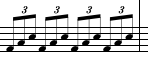
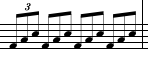
The Show / Hide Tuplets menu hide tuplets if they are visible, and shows them if they have previously been hidden. This menu item is used to hide redundant tuplet indications (as in the example below.)
|
|
The Show / Hide Bracket menu item is used to show or hide the bracket that indicates the beginning and end of the tuplet group. Normally, the bracket is not needed if there is a beam that indicates the tuplet group. However, brackets can be hidden or shown if desired. In the example below, the Show / Hide Bracket menu was applied to all notes.
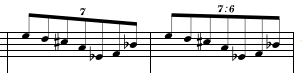
The Show / Hide Ratio menu item is used to show the tuplet ratio if it is not visible and to hide it if it is. The tuplet ratio is used to show the number of notes that the tuplet group should be played in. Normally, ratios are unnecessary except in ambiguous situations or in complex scores. In the example below the tuplet is clarified by showing the ratio (which reveals that it is 7 in the time of 6 eighth notes.)
The Straighten Tuplets menu item is used to reset the angle of the tuplet bracket so that it is parallel to the beam. This item is used in situations where the tuplet bracket has been adjusted manually away from its normal position.


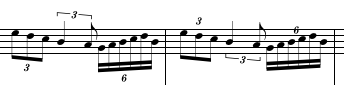
The Flip Tuplet Direction menu item shifts the position of the tuplet so that it is above the note group if it was below, or below the note group if it was above. This menu item does not change any other attributes of the tuplet.
|
|
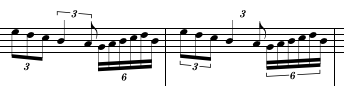
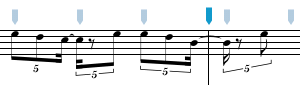
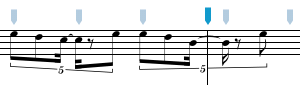
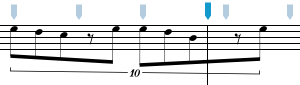
The Form Tuplet menu item is used to create a tuplet group out of selected notes and rests. All notes and rests in the selection must have been entered with the same tuplet setting in the Control panel (i.e. they must all be triplets, or quintuplets, or 7:4, etc.). This menu item is most often used to merge several beats of tuplets into a single tuplet group. The example below should help to clarify this.
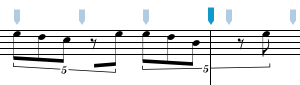
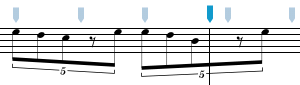
Alternatively, the entire measure could have been formed into a single tuplet group giving us:
|
|
See also


© Keith A. Hamel 1998-2005 - All Rights Reserved |
 - Hiding a tuplet does not change the duration or the beat position of the images --
only the appearance of the tuplet is altered.
- Hiding a tuplet does not change the duration or the beat position of the images --
only the appearance of the tuplet is altered.