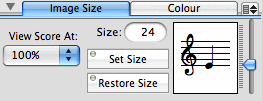
Image Size Tab
The Image Size pane contains controls for setting the size of selected images and for changing the score view size.
The view pull-down menu is a duplicate of the view menu located at the bottom-left corner of the score window. Display sizes between 25% and 200% as well as one custom display size (which is specified in the Preference panel) are available.
The slider along the right side of the pane is used for setting the image size - the image display and the size field are updated as you move the slider. Alternatively, you can enter the desired image size in the Size: field and type return.
Clicking on the Set Size button causes the pointsize of all selected images in the score to be altered. The Restore Size button sets the Size: field and the slider to the default size - 24 point.
All new images entered on the score will be entered at the image size indicated in this panel.
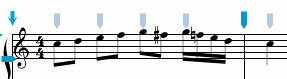
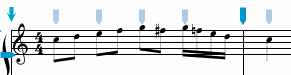
In the example below the notes were entered at pointsize 24 (the default size), then the notes were selected, the image size slider adjusted to 18 pointsize and the Set Size button clicked. You can see that the size of the images is smaller, but none of the other characteristics (length of stem, beam angle, horizontal or vertical position) has changed.
|
|
Colour Tab
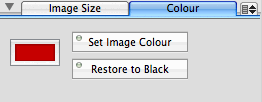
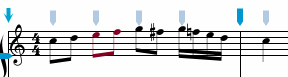
The Colour tab allows you to change any selected images to the colour stored in the colour well. To select a colour, click on the border of the colour well and the Colors panel will appear. Selecting a colour in the Colors panel, or dragging a colour from the panel to the colour well sets the colour of the well. To change the colour of selected images, click on the Set Image Colour button. The Restore Image Colour button sets the colour well back to black. In the example below the second and third notes were selected and the Set Image Colour button clicked.
|
|
Menus Items
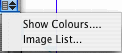
The pull-down menu located at the top-right corner of the Image Attributes pane contains the following items:
| Show Colours... | display the OS-X Colour panel. |
| Images List... | display the Image List panel which shows many of the music images available in NoteAbilityPro along with their commands. |
|
|
See also


© Keith A. Hamel 1998-2005 - All Rights Reserved |
 - Whenever the Entry Cursor is moved to a new staff, the Image Size controls are
updated to the size of this staff. This ensures that in scores containing different sized staves the image sizes will
normally be the same size as the staff onto which they are entered.
- Whenever the Entry Cursor is moved to a new staff, the Image Size controls are
updated to the size of this staff. This ensures that in scores containing different sized staves the image sizes will
normally be the same size as the staff onto which they are entered.