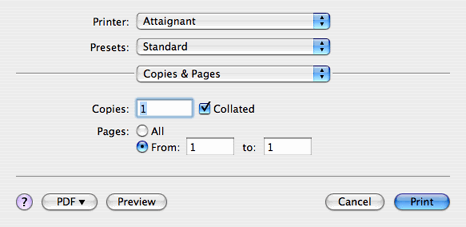

You can see what your document will look like with the current settings by clicking on the Preview button located on the print panel. This action launches the Preview application with a copy of your document in it.
You can save your print job as a PDF file, by selecting the PDF pull-down menu on the print panel, and choosing one of the avaialble PDF or PostScript file formats.

If you do not have a printer set up for use on your computer, use the Print Center application to set up your printer. You can launch the Print Center by selecting "Edit Printer List... which is located in the Printer: pull down menu on the Print panel

In addition to the standard Print... menu item NoteAbility provides a second menu item - Print All... in the File menu which prints all the pages of all open NoteAbility documents one after another. Print All... allows all the files associated with a score (eg. the score and instrumental parts) to be printed with one menu command.
|
|
See also


© Keith A. Hamel 1998-2005 - All Rights Reserved |
 - You should ensure that the Page Setup has been performed for each document before using the Print All... menu item.