|
Music Font Options
The Scriabin font comes installed in NAPro and is the default music font used with the program. However,
you may add other Music fonts to the application and use those music fonts instead of Scriabin.
The following music fonts are supported by NAPro:
- Sonata font (Adobe Inc)
- Petrucci font (Finale)
- Engraver font (Finale)
- Jazz font (Finale)
- Maestro font (Sibelius)
- Maestro Wide font (Sibelius)
- Opus font (Sibelius)
- Inkpen2 font (Sibelius)
- Sonata Std font (Adobe Inc)
- Scriabin6 font (NAPro)
- Broadway Copyist font (Finale)
- Vienna font (Musegraph)
In order to use these fonts with NAPro, you must have a legal licensed copy of the font, it needs to be in .ttf format (with a ".ttf" extension) and it needs
to be placed in the Fonts folder in your Documents folder. Fonts can be transferred to the Fonts directory through iTunes, the iPad File application of through iCloud.
|
 - In the case of the Opus font, you will need both the Opus.ttf and OpusText.ttf files in order for the font to be used. For the Inkpen2 font
you will need both the Inkpen2.ttf and the Inkpen2Text.ttf files. - In the case of the Opus font, you will need both the Opus.ttf and OpusText.ttf files in order for the font to be used. For the Inkpen2 font
you will need both the Inkpen2.ttf and the Inkpen2Text.ttf files.
- Ensure that all fonts you place in the Fonts folder are properly formatted TTF font files - do not include OTF or dFont formats in this folder.
- The Sonata Std font and the Scriabin6 font are older versions of these fonts that have been included for legacy reasons.
|
In order to choose a different music font, select the font in the Fonts pane of the NAPro Preferences and touch the Done button to save the music font as a preference.

Below are examples of the same short excerpt using different music fonts:
Scriabin font

Sonata font

Petrucci font
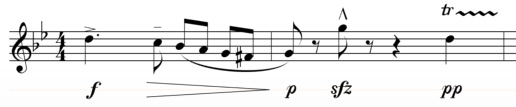
Engraver font

Jazz font

Maestro font

Maestro Wide font

Opus font

InkPen2 font

Swing font

Sonata Std font

Scriabin6 font

Broadway Copyist font

Vienna font

|